
- Team
- App
Team accounts: share your shop with your staff
Invite staff to your Rafiq account by link or QR code. Everyone works in the same inbox, orders and products, each from their own phone.

A shop is rarely run by one person. You can now add team members to your account instead of sharing one login.
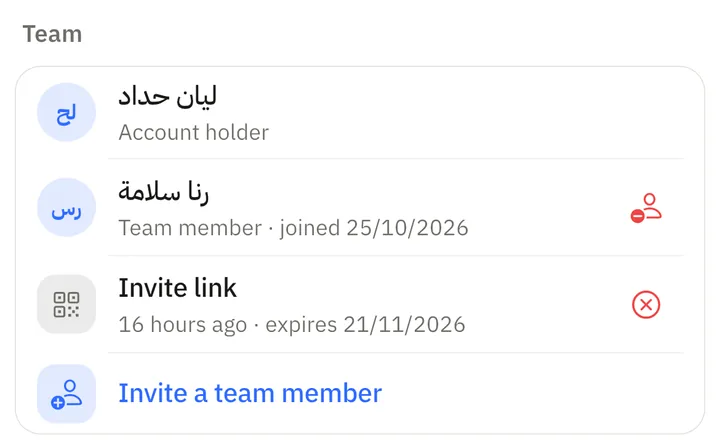
Inviting someone
In the app, open Settings, then Account, and choose Invite a team member under Team. Share the link or let the person scan the QR code. A link works for 7 days and admits the first person who accepts it, so create one link per person.
The person signs in to Rafiq with their own Google or Apple account and accepts. From then on they work inside your account.
What members can do
- See and reply to every conversation, manage orders, add and edit products and change settings, in every shop of the account.
- Receive the same notifications for new orders and conversations that need attention.
- Use the account's credits. There is one wallet for the whole account.
What stays with the owner
Only the owner can create or cancel invites, remove members, add or delete shops, connect WhatsApp and delete the account.
Before joining
A person can belong to one account at a time. To join yours they must first disconnect any pages connected to their own Rafiq account. Their own account is set aside while they are a member and returns when they leave or are removed.