
- Orders
- App
Create an order yourself from any conversation
When you close a sale yourself, create the order from the chat: the form is already filled with the customer's details and the products you discussed.

Rafiq takes orders on its own, but some sales are closed by you: on a call, in a voice note, or after a long negotiation. Until now those orders had to be typed in from scratch.
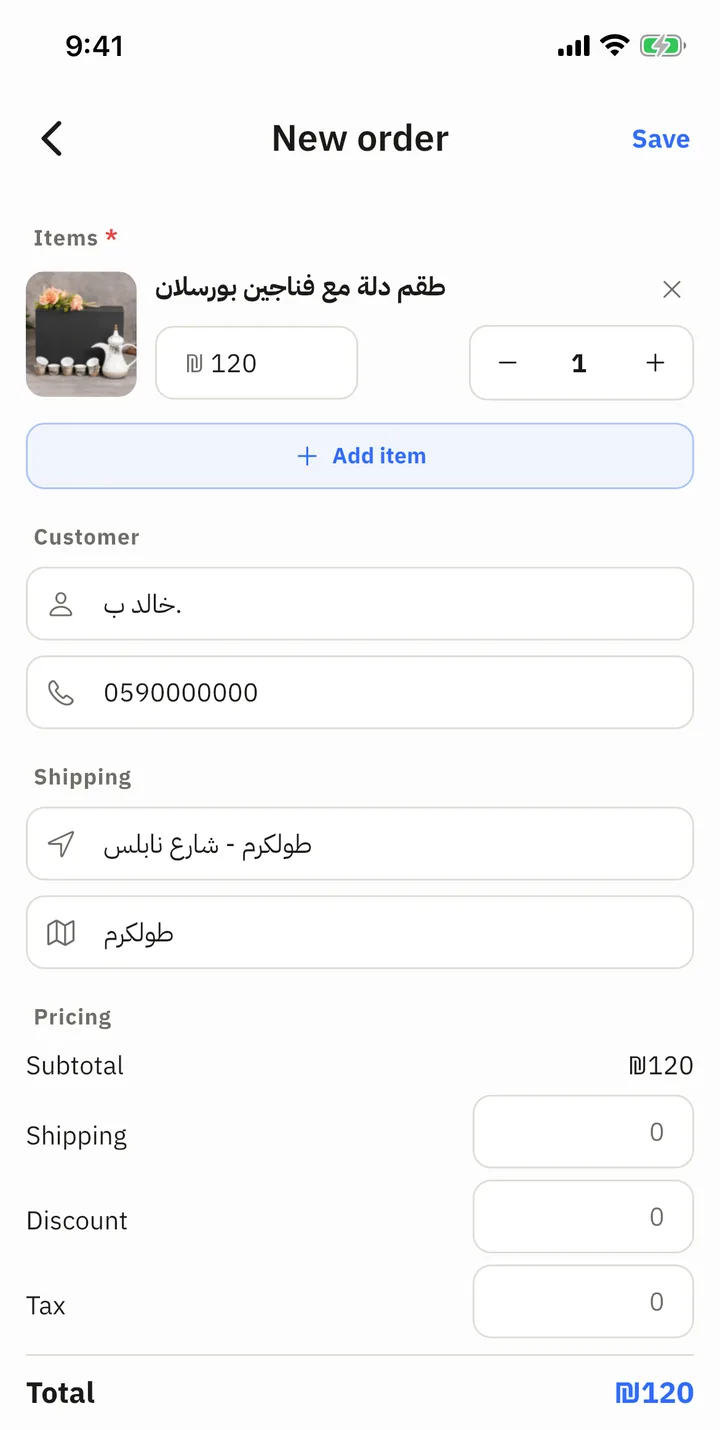
How it works
Open the conversation, tap the info button and choose New order. The form opens already filled with:
- the customer's name, phone and address, as Rafiq collected them in the chat;
- the products discussed in the conversation;
- the cart Rafiq had prepared, if the customer had not confirmed it yet.
Check the details, change what you need and save. The order appears in the Orders tab and is linked to the conversation, and the conversation shows that it has an order.
What Rafiq does with your order
- Rafiq knows the order was placed by the shop. When the customer asks about it, Rafiq answers from the order.
- Rafiq does not change an order you created. If the customer asks to change it, Rafiq hands the request to you.
- Details you type in the form that Rafiq did not have yet, such as the address, are saved for that customer, so they are not asked for again.
- No new-order notification is sent for an order you created yourself.
Creating an order uses no credits.