
- Settings
- AI replies
Reply settings: seen, typing indicator and how long Rafiq pauses
Three new settings per shop: whether customers see "seen", whether they see Rafiq typing, and how long Rafiq stays quiet after you reply yourself.

Shops asked for more control over how Rafiq's replies look and when it steps back. Three settings are now in Rafiq Settings: open Rafiq replies, then Reply behavior. Each shop has its own.
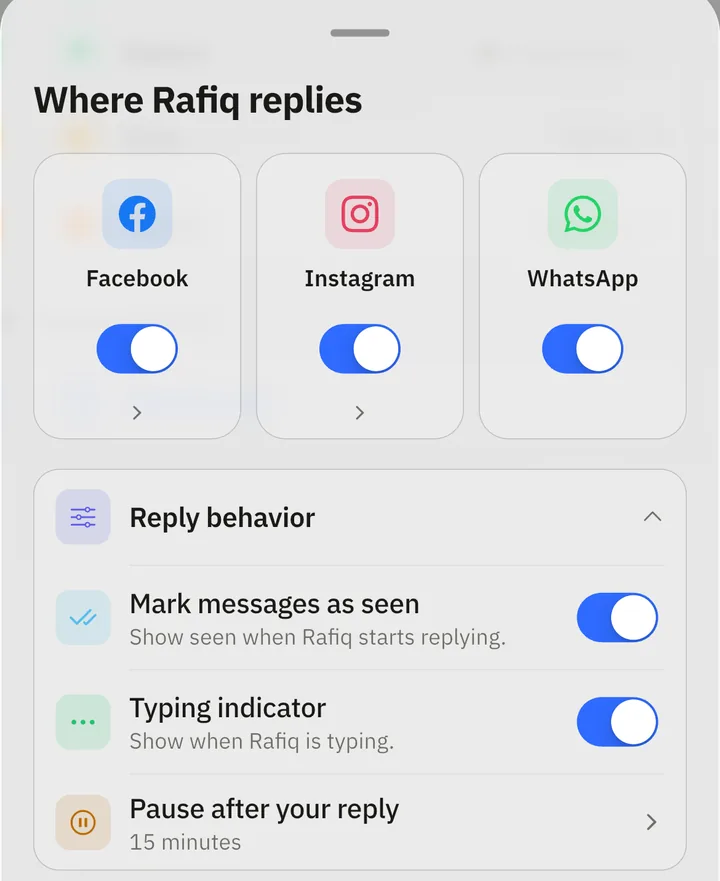
Mark messages as seen
On by default. Turn it off and customers no longer see "seen" when Rafiq starts working on their message.
Typing indicator
On by default. Turn it off and customers no longer see Rafiq typing, before a reply or between the parts of a longer reply. On WhatsApp the typing indicator also marks the message as read, so it appears only while "seen" is on.
Pause after your reply
When you answer a customer yourself, Rafiq stops replying in that conversation so you do not talk over each other. You can now choose for how long: 15 minutes, 1 hour, 8 hours, 24 hours, or indefinitely until you resume it. New shops start with 15 minutes.
This applies wherever you reply from: the Rafiq app, Meta Business Suite for Facebook and Instagram, or the WhatsApp Business app. If a conversation is already paused for longer, the longer pause stays.
You can still pause or resume Rafiq by hand in any single conversation.